The Stable Management System is a free tool built into the Derby Owners Club home pack. It is your stable office: create, organize, and manage all your horses right in your web browser, no card-reader hardware and nothing extra to install. Build a champion, keep a tidy stable, line up retired sires and dams for breeding, and walk any horse out to a player station whenever you want to race.
You usually do not have to start it at all. When you launch a game with one of the
Play - ... files, the Stable Management System opens by itself in your default
web browser.
If you ever close the tab, just open your browser and go to:
http://localhost:8788
Play - ... file (not flycast.exe). If it will not open or will not start by
itself, see Section 13: Troubleshooting for a step-by-step fix.From top to bottom:
The Stable is your barn: the pool of horses you keep on hand for this game version. It is organized into groups so it stays easy to read.
| Active | Your racing horses. Holds up to 10. |
| Sires ♂ | Retired males, ready to breed. Holds up to 2. |
| Dams ♀ | Retired females (and geldings), ready to breed. Holds up to 2. |
Each group header shows a live count, like Active (7/10). The caps keep your stable
tidy. They are a gentle guide, not a wall: if you go over, the count turns red with a friendly
reminder to export a few horses to your PC, but nothing is ever blocked or deleted.
⠿ handle to put your stable in any order you like.Your order is remembered between sessions.
Hover your mouse over any horse, in a Station or the Stable, and a card pops up with everything you need to know at a glance:
| Parents | "by Sire ex Dam", the horse's breeding. |
| Leg type | Its running style (see below), with an icon. |
| Sex | ♂ Male, ♀ Female, or ⚥ Gelding (a gelding runs as a female). |
| Personality | Rough, Imposing, Coward, Honest, or Sloppy. |
| Stat bars | The six race stats (Start, Corner, Out of Box, Competing, Tenacious, Spurt) as quick bars, plus Speed / Stamina / Sharp and a total (Σ). |
| Footer | Coat color, dirt ability, races run, win-place-show record, G1 titles, and earnings. |
A horse's running style comes from where its Start stat ranks among the race stats (the Corner stat is not counted):
| Front-runner | Start is the highest. |
| Start Dash | Start is 2nd highest. |
| Last Spurt | Start is 3rd highest. |
| Stretch-runner | Start is 4th or lower. |
| Almighty | All the stats are equal. |
When a horse retires, it moves out of Active and into the breeding groups so you can find a mate fast:
The colored badge makes it obvious at a glance which horses you can breed from, and the 2-each caps keep your best breeders front and center. Keep your favorite sire and dam here, and rotate others out to your PC when you want to try a new pairing.
Your stable is meant to stay lean. Your full collection lives on your PC as horse files, and you bring horses in and out as you need them. This section is the one to read if file types have ever tripped you up.
A Derby horse can live on your PC in two shapes. They hold the same horse, just written differently:
| File | What it is | Use it for |
|---|---|---|
.card | The actual game card (the exact bytes the game reads).
The tool saves it named after the horse and version, e.g. Gold Queen (Rev C).card. |
The everyday format. Save, store, share, and load these. |
.raw | A text export (the older "Super Juicer" format the
community has long shared). Same name with .RAW, e.g. Gold Queen (Rev C).RAW. |
Sharing with people who use .raw, or importing ones you were given. |
.card or a .raw
and it always knows which horse it is. You can keep whichever you like, they are interchangeable.drbyocwc.zip.card), so saving two horses to one folder overwrote
each other and you couldn't tell them apart. Cards are now saved by horse name, so that can't
happen. If you have old generic-named cards, just load each one (the tool shows you who it is) and
save it again to get a proper name.Gold Queen (Rev C).card..RAW..card and the .RAW together..card or .raw files. They drop straight into the stable; files for another
game are skipped with a note.| Import | Top-right of the Stable. Pick one or more .card or .raw files; they drop into the stable. Wrong-game files are skipped with a note. |
| Export | On any horse's row. Downloads that horse to your PC. The horse stays in your stable; export just makes a copy you can store or share. |
<game>.zip.card name yourself.
Keep your PC files named by horse; let the tool handle the game side.Click Create New Horse to start fresh, or open an existing one to change it:
| Name / Sire / Dam | Up to 18 letters each. Sire and Dam are the parents. |
| Sex | Male, Female, or Gelding. |
| Color | The usual coats, plus special ones marked with a star (Panda, Zebra, Tiger, and more). |
| Personality | Rough, Imposing, Coward, Honest, or Sloppy. |
| External (current) | Start, Corner, Out of Box, Competing, Tenacious, Spurt. Range 1 to 64. |
| External (retirement) | The same six at peak. Range 1 to 16 (the ✕ △ ○ ◎ symbols). |
| Internal | Stamina, Speed, Sharp. Current caps at 60, retirement at 45. |
| Dirt Ability | 0 to 255. Higher is a better dirt runner. |
Set Total Races and the Won / Place / Show / Out breakdown, Hearts (0 to 16) and Earnings. Tick any G1 Titles won, and under Appearance choose the silk pattern, two colors, and hood. Tick Retired (and set breeds) to send the horse to your Sires/Dams.
The four Stations (Sat 1 to 4) are your starting gates, one per player. Load up to four different horses for a four-player race.
| To Station | Places the open horse onto a Station you pick. Walk it right out to the track. |
| To Library | Saves the open horse into your stable to use later. |
| Save → Lib | (next to a Station) Moves that station's horse into your stable and frees the gate. |
| Load | (in the Stable) Sends the chosen horse out to a Station. |
| Save .card (to PC) | Downloads the open horse to your PC as <Horse> (<version>).card for backup or sharing (see Section 7). The horse stays where it is; this just makes a named copy. |
| Save both | Downloads the .card and the .RAW for the open horse in one click, both named after the horse and version. |
The Japanese games use a different card format, and the Stable Management System reads and edits it. Japanese horse names show correctly in katakana, and the Quick View shows the horse's name, sire, and dam.
Load a Japanese card (DOC 2000 or DOC Original) and you can now:
When you save, the card's ID, format markers, and data are preserved, only the name and pedigree are rewritten, so the card still loads cleanly in the game.
Card-Library folder to keep your stable safe.Click a window first, then it listens to the keyboard:
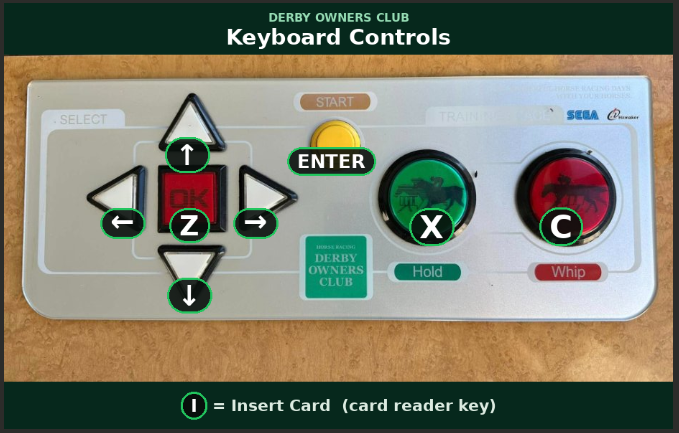
| Key | Does |
|---|---|
| Arrow keys | Move / choose |
| Enter | Start: create a horse / confirm |
| Z | Button A |
| X | Button B (back / cancel) |
| C | Button C: this is your WHIP during a race! |
| V | Button D |
| I | Insert Card (load a saved horse) |
The Stable Management System is a small web page your own PC serves locally. It starts on its own
only when you open the game through a Play - ... file. Work through these in order:
| 1. Use a Play file | Open the game by double-clicking a Play - ... file (for example Play - World Edition EX (English).bat), not flycast.exe. Only the Play file starts the suite and opens it in your browser. |
| 2. Use http, not https | If you open it by hand, type http://127.0.0.1:8788 (or http://localhost:8788). It must be http: if the browser jumps to https it will not connect. Trying a different browser can also help. |
| 3. Check the Tools folder | Your Derby folder must have a Tools folder next to the Play files. If it is missing (older downloads predate the suite), re-download the pack, or add the small Card Suite Add-On and say Yes to replace _launch.ps1. |
| 4. Find the helper window | Right after launch, a small minimized blue window opens (PowerShell, running the suite). Look on your taskbar. If it is there but no browser tab appeared, just open http://127.0.0.1:8788 yourself. |
| 5. If that window flashes and closes | Security software is blocking it. If Windows asks to allow PowerShell or the firewall, click Allow. If you run a third-party antivirus or a VPN/proxy, pause it and relaunch (a VPN can redirect localhost). |
Tools folder and double-click DOC-Card-Creator.html: the card creator opens straight
in your browser as a normal file, where you can build, edit, and save/convert horses. Only "send to a
running station" and the live stable view need the auto-started helper.satN\data folder,
and your stable is the Card-Library folder.The Stable Management System manages your horses. Two more free, in-browser tools cover the rest of Derby Owners Club, and like the stable office, they run on your own PC with nothing uploaded.
A breeding planner for all four versions. Browse every CPU horse, see its surface, distance, running style and standout abilities, and breed any sire & dam to project the foal before you spend a credit. The data is read straight from the arcade ROMs, and the Japanese versions show names in katakana with English. Open it: Breeder Studio.
Goes a level deeper than cards: it edits the game's built-in data in the program ROM, the 244 CPU horses and their stats, breeding stock, race & track names, and on-screen text, then hands you back a finished ROM. It covers all four versions and edits the Japanese ones natively (Japanese text with romaji and an optional translation helper).
.zip, make your edits, and
click Build ready-to-play .zip. ROM Studio rebuilds the complete zip in your browser, with all the
mask ROMs kept exactly as the game expects, so you just drop it into your ROMs\… folder and
double-click Play. No repacking, no hex editor. Open it & read the guide:
DOC ROM Studio. DOC
DOC